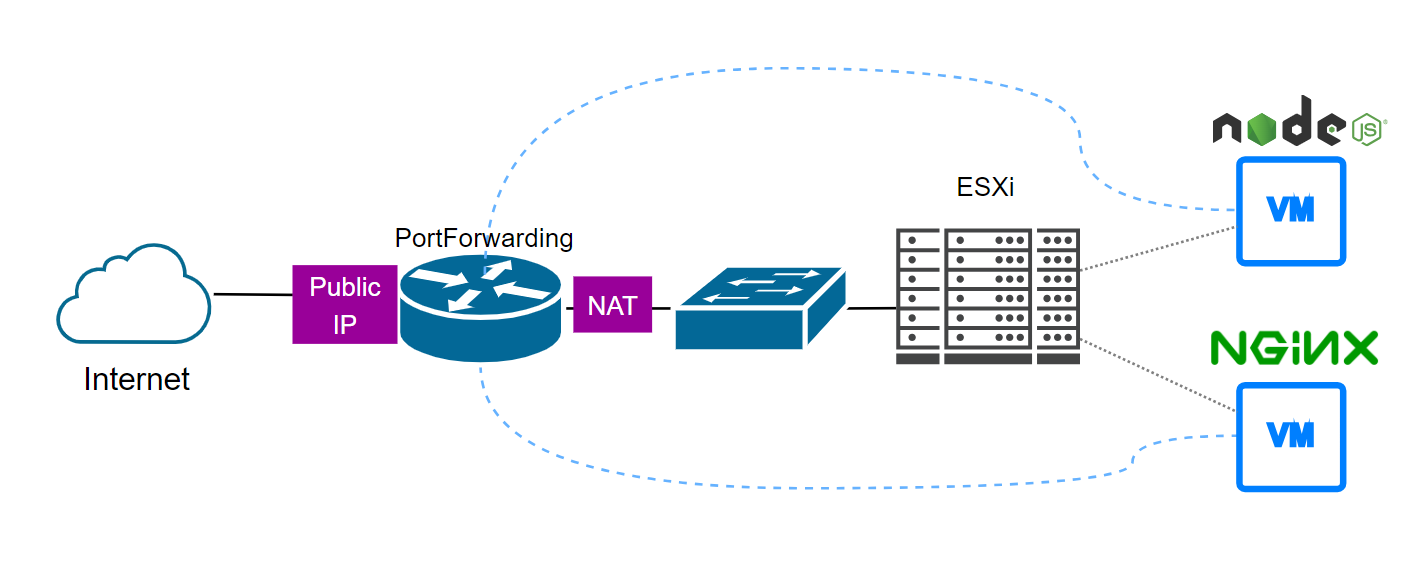
Goals:
- Renew Lets Encrypt Certificate for NodeJS Express environment
- Renew Lets Encrypt Certificate for Nginx environment
Lab Setup:
First, we need to ensure that both servers (NodeJS and Nginx) are reachable from the internet.
NodeJS + Express
1. Check existing certificates status: sudo certbot certificates
- - - - - - - - - - - - - - - - - - - - - - - - - - - - - - - - - - - - - - - -Found the following certs: Certificate Name: yourdomain.example.net Domains: yourdomain.example.net Expiry Date: 2023-06-05 09:01:50+00:00 (INVALID: EXPIRED) Certificate Path: /etc/letsencrypt/live/yourdomain.example.net/fullchain.pem Private Key Path: /etc/letsencrypt/live/yourdomain.example.net/privkey.pem- - - - - - - - - - - - - - - - - - - - - - - - - - - - - - - - - - - - - - - -
2. Run renewal command with --manual options: sudo certbot certonly --manual
Saving debug log to /var/log/letsencrypt/letsencrypt.logPlugins selected: Authenticator manual, Installer NonePlease enter in your domain name(s) (comma and/or space separated) (Enter 'c'to cancel): yourdomain.example.netCert is due for renewal, auto-renewing...Renewing an existing certificatePerforming the following challenges:http-01 challenge for yourdomain.example.net
- - - - - - - - - - - - - - - - - - - - - - - - - - - - - - - - - - - - - - - -NOTE: The IP of this machine will be publicly logged as having requested thiscertificate. If you're running certbot in manual mode on a machine that is notyour server, please ensure you're okay with that.
Are you OK with your IP being logged?- - - - - - - - - - - - - - - - - - - - - - - - - - - - - - - - - - - - - - - -(Y)es/(N)o: Y
- - - - - - - - - - - - - - - - - - - - - - - - - - - - - - - - - - - - - - - -Create a file containing just this data:
501qXqoV61Ri-TmrxtxncKiVKodHLQQPH-e-qQRobD8.pwNFrFIoSc7J7sUl4e7j8UBXl8ciU02FtZCPzx1fnAU
And make it available on your web server at this URL:
http://yourdomain.example.net/.well-known/acme-challenge/501qXqoV61Ri-TmrxtxncKiVKodHLQQPH-e-qQRobD8
- - - - - - - - - - - - - - - - - - - - - - - - - - - - - - - - - - - - - - - -Press Enter to Continue
3. Before press enter, ensure you have setup express route to match with the requirements and setup two http listeners (HTTP and HTTPS)
//certbot challenge app.get('/.well-known/acme-challenge/501qXqoV61Ri-TmrxtxncKiVKodHLQQPH-e-qQRobD8', (req,res) => { res.send('501qXqoV61Ri-TmrxtxncKiVKodHLQQPH-e-qQRobD8.pwNFrFIoSc7J7sUl4e7j8UBXl8ciU02FtZCPzx1fnAU') })
4. Enable the first HTTP server listener, lets encrypt will contact your server via http port for verification (port 80 forwarded to 8000 from router)
httpServer.listen(8000, () => { console.log(`Server is running on port 8000`) })
5. Hit enter to continue verification
Waiting for verification...Cleaning up challenges
IMPORTANT NOTES: - Congratulations! Your certificate and chain have been saved at: /etc/letsencrypt/live/yourdomain.example.net/fullchain.pem Your key file has been saved at: /etc/letsencrypt/live/yourdomain.example.net/privkey.pem Your cert will expire on 2023-09-19. To obtain a new or tweaked version of this certificate in the future, simply run certbot again. To non-interactively renew *all* of your certificates, run "certbot renew" - If you like Certbot, please consider supporting our work by:
Donating to ISRG / Let's Encrypt: https://letsencrypt.org/donate Donating to EFF: https://eff.org/donate-le
6. Disable HTTP server and enable HTTPS Server listener.
httpsServer.listen(8443, () => { console.log(`Server is running on port 8443`)})
7. Copy renewed certificates to NodeJS express crt directory root@dev:/etc/letsencrypt/live/yourdomain.example.net# cp *.* ~/mynodeapp/crt/root@dev:/etc/letsencrypt/live/yourdomain.example.net# ls -la ~/mynodeapp/crt/total 32drwxr-xr-x 2 oki oki 4096 Sep 5 2022 .drwxr-xr-x 9 oki oki 4096 Jun 14 18:04 ..-rw-r--r-- 1 root oki 1854 Jun 21 12:31 cert.pem-rw-r--r-- 1 root oki 3750 Jun 21 12:31 chain.pem-rw-r--r-- 1 root oki 5604 Jun 21 12:31 fullchain.pem-rw------- 1 oki oki 1704 Jun 21 12:31 privkey.pem-rw-r--r-- 1 root root 692 Mar 7 17:05 README
Nginx
1. Set forwarder from router to Nginx, for this case im using 1 to 1 NAT
2. Check existing certificates status: sudo certbot certificates
3. Run renewal command: sudo certbot –-nginx certonly -d "yourexampledomain.com"
oki@dev2:~$ sudo certbot --nginx certonly -d "yourexampledomain.com"Saving debug log to /var/log/letsencrypt/letsencrypt.logRenewing an existing certificate for yourexampledomain.com
Successfully received certificate.Certificate is saved at: /etc/letsencrypt/live/yourexampledomain.com/fullchain.pemKey is saved at: /etc/letsencrypt/live/yourexampledomain.com/privkey.pemThis certificate expires on 2024-06-16.These files will be updated when the certificate renews.Certbot has set up a scheduled task to automatically renew this certificate in the background.
- - - - - - - - - - - - - - - - - - - - - - - - - - - - - - - - - - - - - - - -If you like Certbot, please consider supporting our work by: * Donating to ISRG / Let's Encrypt: https://letsencrypt.org/donate * Donating to EFF: https://eff.org/donate-le- - - - - - - - - - - - - - - - - - - - - - - - - - - - - - - - - - - - - - - -oki@dev2:~$ sudo certbot certificatesSaving debug log to /var/log/letsencrypt/letsencrypt.log
- - - - - - - - - - - - - - - - - - - - - - - - - - - - - - - - - - - - - - - -Found the following certs: Certificate Name: yourexampledomain.com Serial Number: XXXXXXXX Key Type: RSA Domains: yourexampledomain.com Expiry Date: 2024-06-16 02:28:13+00:00 (VALID: 89 days) Certificate Path: /etc/letsencrypt/live/yourexampledomain.com/fullchain.pem Private Key Path: /etc/letsencrypt/live/yourexampledomain.com/privkey.pem- - - - - - - - - - - - - - - - - - - - - - - - - - - - - - - - - - - - - - - -